Blog

杜兰德线(Durand Line)

Content #

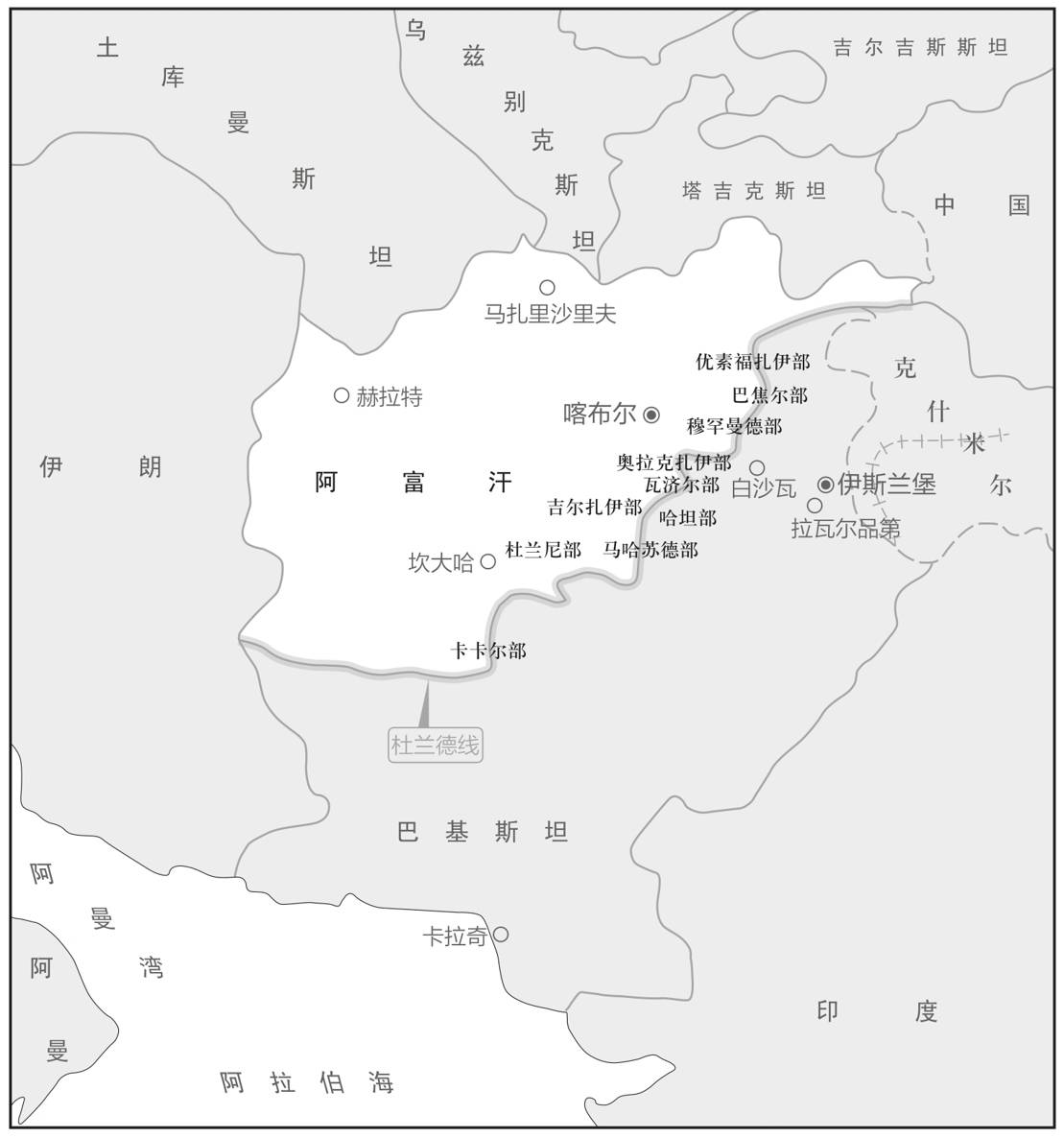
阿卜杜尔·拉赫曼在登基之初曾和英国人谈过一笔交易。这一次,双方将正式确定这份协议。使团本应由弗雷德里克·罗伯茨(Frederick Roberts)将军率领,但是,阿卜杜尔·拉赫曼却对英方的人事安排提出了异议。第二次英阿战争,罗伯茨起了主导作用,阿富汗人无不恨他入骨,阿卜杜尔·拉赫曼也容不下这样一个谈判对象,他表示,纵然王权坚硬如铁,也无力压制臣民的怒火。于是,英方临时换人,改派英印当局的外交部长马蒂摩尔·杜兰德。

这是一次两人会议。杜兰德只身前来,阿卜杜尔·拉赫曼的左右也没有顾问,地方长老、民意代表更是不见踪影。会谈中,这位英国外交官提出了关于阿富汗南部边界的建议,阿富汗国王表示接受。那次谈判的结果一直贻害至今。杜兰德大手一挥,就把普什图人的聚居区一分为二。他这一笔是如此随意,甚至丝毫未曾考虑所在区域的地貌和环境。如果你到了那里,除非有人告诉你,否则你不知道这条线在哪里。“杜兰德线”(Durand Line)两侧的村庄住着同一个部落的成员。对他们而言,界线那一头往往就是自家亲戚的住地。那么,杜兰德是如何决定这条线的呢?其实,这条线标志着在某一特定时刻的混战线。杜兰德线是英国在不被击退的情况下推进阿富汗领土的最远处。因此,它肯定是一个长期冲突的地方。它埋下了阿富汗因失去白沙瓦而产生的怨恨火种,由此而来的种种政治争端将持续久远。

然而,为了实现他的最终目标,阿卜杜尔·拉赫曼需要一片确定的领土,以实施绝对的统治。因此,阿卜杜尔·拉赫曼接受了杜兰德线。其实,任何能将世界其他地方排除在外的提议都能得到埃米尔的认可。国界一经确定,便立即遭到封禁。此后,少有阿富汗人能够得到出国游历的机会,而外人也基本无法进入阿富汗,埃米尔的政府还对输入的工业品、信息严加控制。为了更有效地将他的国家与外部世界隔离开来,他颁布法令,禁止在其境内修建铁路。阿卜杜尔·拉赫曼切断了阿富汗与现代文明的联系,阿富汗境内了无一丝现代风气。不过,他觉得自己得到了天赐良机,可以大展宏图了。

` O
From #

无规则游戏——阿富汗屡被中断的历史

加尔各答黑洞(Black Holes of Calcutta)

Content #

1756年,英、印双方在贸易港口加尔各答爆发冲突。莫卧儿帝国驻孟加拉省的总督纳瓦布(Nawab)下令逮捕了一批英国公民,并将他们关进一间小牢房。他们在狱中的容身之地实在逼仄难受,为此,欧洲媒体还发明了一个全新词汇——“加尔各答黑洞”(Black Holes of Calcutta)。只在小小的黑洞中待了一天,就有不少人丧了命。

恶行很快传到了东印度公司设在本地治理(Pondicherry)的总部。盛怒之下,东印度公司决定教训一下纳瓦布。罗伯特·克莱武(Robert Clive)率领一支小型武装,北上袭击了加尔各答,纳瓦布的势力一触即溃。在克莱武的扶植下,纳瓦布的侄子接替了叔叔的职务。这次军事冒险被英方称为“普拉西战役”(battle of Plassey)。

其实,这谈不上是一场战役,倒更像是一种行政程序。此前,英国人浑然不知,孟加拉的大局早已落入己方的掌控。经此一役,他们才恍然醒悟。殖民活动的起点已经无法考证,不过,普拉西一役过后,东印度公司在孟加拉和印度的任何其他地方愈发为所欲为,类似的军事冒险也越来越多。

From #

无规则游戏——阿富汗屡被中断的历史

Simplify Multi-Hop SSH Connections and Transparently Proxy SSH Connections

Content #

Put the following in the ~/.ssh/config file.

Host jumphost.example.com
  ProxyCommand none
Host *.example.com
  ProxyCommand ssh -W %h:%p jumphost.example.com

If you need to access a host that sits behind an SSH gateway server or jump server, you can make your life easier by telling SSH to automatically use the SSH gateway when you connect to the final remote host.

Instead of first connecting to the gateway and then entering another ssh command to connect to the destination host, you simply type “ssh destination-host” from your local machine. Using the above configuration, this command will proxy your ssh connection to server1 through jumphost.

...

extract the status code and hour and count the unique occurrences

Content #

Let’s find the all of the unique HTTP status codes in an apache web server log file named access.log. To do this, print out the ninth item in the log file with the awk command.

$ tail -1 access.log
18.19.20.21 - - [19/Apr/2014:19:51:20 -0400] "GET / HTTP/1.1" 200 7136 "-" "Mozilla/5.0 (Windows NT 6.1; WOW64) AppleWebKit/537.36 (KHTML, like Gecko) Chrome/33.0.1750.154 Safari/537.36"
$ tail -1 access.log | awk '{print $9}'
200
$ awk '{print $9}' access.log | sort | uniq
200
301
302
404
$

Let’s take it another step forward and count how many of each status code we have.

...

指定进程使用特定的路由表

Content #

Linux 中可以使用 iptables 和 iproute2 工具来指定某个进程使用特定的路由表来访问网络。

首先,使用 iptables 命令将进程的网络流量标记为特定的标记(如标记号为 1)。例如,可以使用以下命令:

iptables -t mangle -A OUTPUT -m owner --pid-owner <进程PID> -j MARK --set-mark 1

然后,使用 iproute2 工具创建一个新的路由表,并在该表中指定特定的路由规则。例如,可以使用以下命令:

``` echo “1 special_table” >> /etc/iproute2/rt_tables ip rule add fwmark 1 lookup special_table ip route add default via <特定网关IP> dev <特定网络接口> table special_table ```

在上述命令中,特定网关 IP 是指要指定给该进程的网关 IP,特定网络接口是指要指定给该进程的网络接口。

From #

proto(ip route)

Content #

the routing protocol identifier of this route. RTPROTO may be a number or a string from the file /etc/iproute2/rt_protos.

If the routing protocol ID is not given, ip assumes protocol boot.

Several protocol values have a fixed interpretation. Namely:

  1. redirect the route was installed due to an ICMP redirect.
  2. kernel the route was installed by the kernel during autoconfiguration.
  3. boot the route was installed during the bootup sequence. If a routing daemon starts, it will purge all of them.
  4. static the route was installed by the administrator to override dynamic routing. Routing daemon will respect them and, probably, even advertise them to its peers.
  5. ra the route was installed by Router Discovery protocol.

The rest of the values are not reserved and the administrator is free to assign (or not to assign) protocol tags.

...

scope(ip route)

Content #

the scope of the destinations covered by the route prefix. SCOPE_VAL may be a number or a string from the file /etc/iproute2/rt_scopes.

If this parameter is omitted, ip assumes scope global for all gatewayed unicast routes.

scope link for direct unicast and broadcast routes

scope host for local routes.

From #

Routing Policy Database

Content #

kernel feature: IP: advanced router -> IP: policy routing 默认情况下有三个table: local, main, default。下面的命令列出所有的rule. ``` ❯ ip rule list 0: from all lookup local 32766: from all lookup main 32767: from all lookup default ``` 第1列的数字为优先级,“from all"表示这些规则对所有的包均为有效。 route命令和默认情况下的ip命令都只修改main和local表。 ip route ls 查看的是main表。通过生成rule来指向不同的表,可以更改系统的路由。

From #

生成Service yaml(kubectl expose)

Content #

Service生成不用命令 kubectl create,而是 kubectl expose。 kubectl expose 支持从 Pod、Deployment、DaemonSet 创建服务。

使用 kubectl expose 指令时还需要用参数 –port 和 –target-port 分别指定映射端口和容器端口,而 Service 自己的 IP 地址和后端 Pod 的 IP 地址可以自动生成。

export out="--dry-run=client -o yaml"
kubectl expose deploy ngx-dep --port=80 --target-port=80 $out

生成的 Service YAML 大概是这样的:

apiVersion: v1
kind: Service
metadata:
  name: ngx-svc

spec:
  selector:
    app: ngx-dep

  ports:
  - port: 80
    targetPort: 80
    protocol: TCP

Viewpoints #

From #

20|Service:微服务架构的应对之道