Blog

status file(OpenVPN)

Content #

OpenVPN offers several options to monitor the clients connected to a server. The most commonly used method is using a status file. The OpenVPN status file is continually updated by the OpenVPN process and contains the following information:

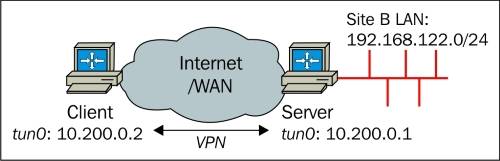
Which clients are connected

  1. From which IP address the clients are connecting
  2. The number of bytes each client has received and transferred
  3. The time at which the client connected
  4. In addition, the routing table also shows which networks are routed to each client
status /var/run/openvpn.status 3

The second parameter to the status option is the interval after which the status file is updated (rewritten). The default value is 60 seconds.

...
Client-side routing(OpenVPN)

Content #

Sometimes, it is useful to allow the VPN server (or other VPN clients) to access resources connected to a particular client. This is known as client-side routing.

Client-side routing in OpenVPN requires a CCD file for that client containing an iroute statement. It also requires a corresponding route statement in the OpenVPN server configuration file.

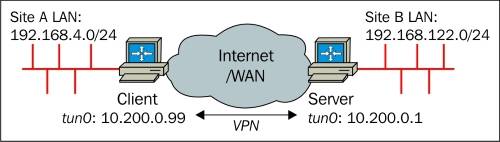
Consider the following network layout:

The subnet 192.168.4.0/24 needs to be accessible from the server-side LAN and the server-side subnet 192.168.122.0/24 needs to be accessible from the client-side LAN. This can be achieved as follows:

...

Client-specific configuration – CCD files

Content #

client-config-dir: 为不同客户端配置不同的选项,比如:

  1. 为特定的客户端指定的IP.
  2. 为特定的客户端推送DNS.
  3. 暂时关闭某个客户端.

如果要实现同一个OpenVPN服务器下某些客户端之间的路由,client-config-dir 是必不可少的配置。

A client-config-dir or CCD file can contain the following options:

  1. push: This is useful for pushing DNS and WINS servers, routes, and so on
  2. push-reset: This is useful to overrule global push options
  3. iroute: This is useful for routing IPv4 client subnets to the server
  4. iroute-ipv6: This is useful for routing IPv6 client subnets to the server
  5. ifconfig-push: This is useful for assigning a specific IPv4 address to a client
  6. ifconfig-ipv6-push: This is useful for assigning a specific IPv6 address to a client
  7. disable: This is useful for temporarily disabling a client altogether
  8. config: This is useful for including another CCD configuration file

In order to use CCD files, we add a line to configuration file:

...

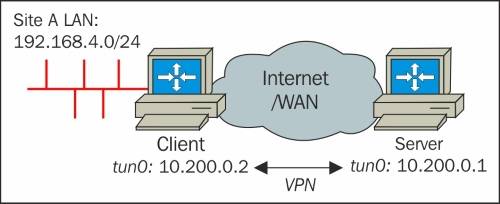
client LAN routed over the VPN tunnel to the server

Content #

On the server side:

openvpn --ifocnfig 10.200.0.1 10.200.0.2 --dev tun --secret secret.key 0 \
--route 192.168.4.0 255.255.255.0 --daemon --log /var/log/vpn_server.log

On the client side:

openvpn --ifconfig 10.200.0.2 10.200.0.1 --dev tun --secret secret.key 1 \
--remote server.ip --daemon --log /var/log/vpn_client.log

Instead of using the OpenVPn –route statement, we can also use the following command:

[root@server]# ip route add 192.168.4.0/24 via 10.200.0.2

这样配置过后,还必须在客户端做如下配置,才能让OpenVPN server ping通client LAN上的机器。 client LAN side:

...

route directive(OpenVPN)

Content #

The syntax and options for the route directive is:

route <network> <netmask> vpn_gateway <metric>

The word vpn_gateway is a special OpenVPN keyword and it specifies the VPN remote endpoint address. Normally, this keyword does not have to be specified, unless it is also necessary to specify the metric for this route.

Here, gateway can either be explicitly set as an IPv4 address, or the special keywords vpn_gateway or net_gateway can be used. If no gateway and no metric are specified, then vpn_gateway is used.

...

Server-side routing(OpenVPN)

Content #

Server side config:

server 10.200.0.0 255.255.255.0
topology subnet
...
push "route 192.168.122.0 255.255.255.0"

push会在客户端的路由表上添加记录,表示对192.168.122.0/24的访问要以 vpn服务器来网关来访问。

在vpn服务器上还要启用ip_forward:

sysctl -w net.ipv4.ip_forward=1

在vpn服务器所在的LAN的网关上添加如下路由规则:

ip route add 10.200.0.0/24 via 192.168.122.1

其中192.168.122.1为vpn服务器在LAN上的地址。

From #

Mastering OpenVPN

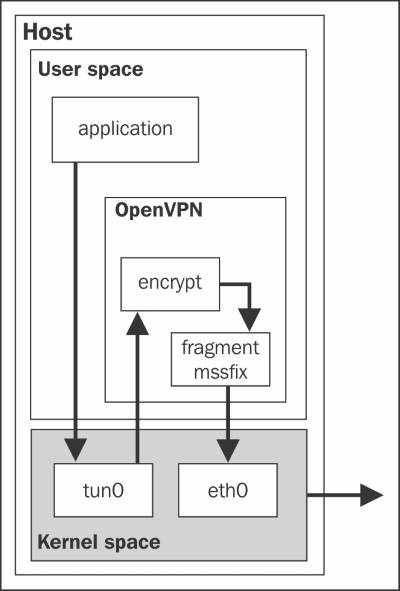
The flow of traffic from a user application via OpenVPN

Content #

  1. The application hands over the packet to the operating system.
  2. The OS decides using normal routing rules that the packet needs to be routed via the VPN.
  3. The packet is then forwarded to the kernel tun device.
  4. The kernel tun device forwards the packets to the (user-space) OpenVPN process.
  5. The OpenVPN process encrypts and signs the packet, fragments it if necessary, and then hands it over to the kernel again to send it to the address of the remote VPN endpoint.
  6. The kernel picks up the encrypted packet and forwards it to the remote VPN endpoint, where the same process is reversed.

From #

Mastering OpenVPN

...

Checking certificate key usage attributes

Content #

When X.509 certificates are generated, special Extended Key Usage (EKU) attributes can be added to the certificate. This allows us to specify a purpose for the certificate, for example as a server-only certificate or a client-only certificate. Certificates used by secure websites make use of the same EKU attributes.

To check the EKU attributes of a certificate, use the following commands:

$ openssl x509 -text -noout -in server.crt | \
     grep -C 1 “Key Usage”

X509v3 Extended Key Usage:
    TLS Web Server Authentication
X509v3 Key Usage:
    Digital Signature, Key Encipherment

This tells us that the server.crt certificate can be used only for server authentication.

...

OpenVPN Options

Content #

  1. persist-tun and persist-key

Instruct OpenVPN to neither reopen the tun device, nor generate new keying material whenever the tunnel is restarted. These options are particularly useful in combination with user nobody, as the user nobody normally does not have the access rights to open a new tun interface.

  1. keepalive 10 60

This is used to make sure that the VPN connection remains up, even if there is no traffic flowing over the tunnel. The keepalive statement is a macro for the ping and ping-restart commands. The statement keepalive 10 60 in a server-side configuration expands to:

...

The topology subnet

The topology subnet #

When using –topology subnet, a single Ip address and netmask are assigned to the tun interface, with no peer address specified.

It is possible to use this topology option to make the tun style point-to-point setup almost exactly the same as the corresponding tap style setup.

  1. Start the first endpoint in the listening mode

    openvpn --ifconfig 10.200.0.1 255.255.255.0 --dev tun --topology subnet
    
  2. launch the OpenVPN client

    ...