Blog

快速重传(Fast Retransmission)

Content #

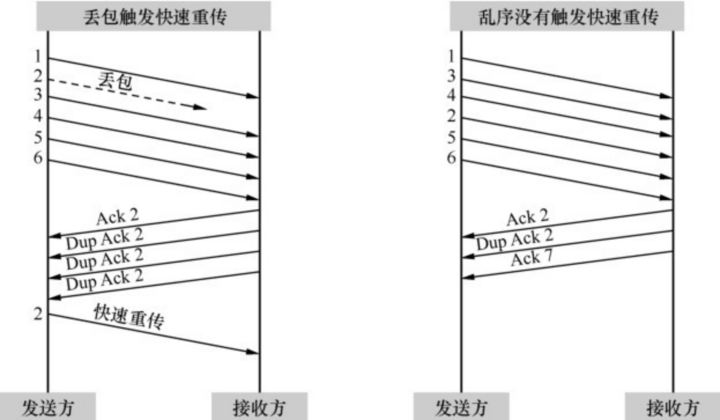
有时候拥塞很轻微,只有少量的包丢失。还有些偶然因素,比如校验码不对的时候,会导致单个丢包。这两种丢包症状和严重拥塞时不一样,因为后续有包能正常到达。当后续的包到达接收方时,接收方会发现其Seq号比期望的大,所以它每收到一个包就Ack一次期望的Seq号,以此提醒发送方重传。当发送方收到3个或以上重复确认(Dup Ack)时,就意识到相应的包已经丢了,从而立即重传它。这个过程称为快速重传。之所以称为快速,是因为它不像超时重传一样需要等待一段时间。

为什么要规定凑满3个呢?这是因为网络包有时会乱序,乱序的包一样会触发重复的 Ack,但是为了乱序而重传没有必要。由于一般乱序的距离不会相差太大,比如2号包也许会跑到4号包后面,但不太可能跑到6号包后面,所以限定成3个或以上可以在很大程度上避免因乱序而触发快速重传。 左图中2号包的丢失凑满了3个Dup Ack,所以触发快速重传。而右图的2号包跑到 4号包后面,却因为凑不满3个Ack而没有触发快速重传。
From #

Wireshark网络分析就这么简单

NAT Table Features

nat table #

target extension: SNAT, DNAT, MASQUERADE, REDIRECT

  • MASQUERADE

A specialized form of source NAT for connections that are assigned a temporary, changeable, dynamically assigned IP address (such as a phone dial-up connection)

  • REDIRECT

A specialized form of destination NAT that redirects the packet to the local host, regardless of the address in the IP header’s destination field

It has three built-in chains:

  • The PREROUTING chain specifies destination changes to incoming packets before passing the packet to the routing function (DNAT). Changes to the destination address can be to the local host (transparent proxying, port redirection) or to a different host for host forwarding (ipmasqadm functionality, port forwarding in Linux parlance) or load sharing.

    ...

limit filter Table Match Extension

Content #

  1. –limit <rate> Maximum number of packets to match within the given time frame. The default value is five matches.
  2. –limit-burst <number> Maximum number of initial packets to match before applying the limit. The default limit is three matches per hour.

If match limiting is enabled, the default is that, after an initial burst of five matched packets, a rate limit of three matches per hour is imposed. In other words, if the system were flooded with ping packets, for example, the first five pings would match. After that, a single ping packet could be matched 20 minutes later, and another one could be matched 20 minutes after that, regardless of how many echo-requests were received. The disposition of the packets, whether logged or not, would depend on any subsequent rules regarding the packets.

...

Separate rule tables for different functionality

Content #

iptables uses the concept of seperate rule tables for different kinds of packet-processing functionality. These rule tables are implemented as functionally separate table modules.

filter table #

  1. target extensions

REJECT, BALANCE, MIRROR, TEE, IDLETIMER, AUDIT, CLASSIFY, CLUSTERIP CONNMARK, TRACE, LOG, ULOG

  1. many match extensions

mangle table #

target extentions: MARK, TOS

  1. NAT Table Features

From #

Linux Security: Enhancing Security with nftables and Beyond

需要执行daemon-reload的情形

Content #

  1. 修改了/etc/systemd/system目录中的单元文件

如果你手动编辑或添加了 systemd 单元文件,例如服务文件(.service)、套接字文件(.socket)、设备文件(.device)等,执行 systemctl daemon-reload 可以使 systemd 重新加载并识别这些更改。

  1. 对/etc/systemd/system.conf或/etc/systemd/user.conf进行更改

如果你更改了 systemd 的全局配置文件,即 /etc/systemd/system.conf 或用户配置文件 /etc/systemd/user.conf,执行 systemctl daemon-reload 可以确保 systemd 使用新的配置。

  1. 对单元文件的软链接进行更改

如果你使用了单元文件的软链接(symbolic link)来管理 systemd 单元,当你更改了这些软链接时,也可能需要重新加载 systemd。

From #

Concatenation with concat filter(ffmpeg)

Content #

Prerequisites for a proper filter results:

  1. all segments must start at timestamp 0
  2. corresponding streams must use in all segments the same parameters, especially the video size
  3. recommended is the same frame rate, otherwise the output will use a variable frame rate

Concat filter enables to join various formats, some examples are:

ffmpeg -i input1.avi -i input2.avi -filter_complex concat output.avi
ffmpeg -i input1.avi -i input2.avi -filter_complex concat output.mp4
ffmpeg -i input1.avi -i input2.mp4 -filter_complex concat output.webm
ffmpeg -i input1.avi -i input2.mp4 -i input3.mkv \
    -filter_complex concat=n=3 output.flv
ffmpeg -i input1.avi -i input2.avi -i input3.avi -i input4.avi \
    -filter_complex concat=n=4 output.mp4
f -i 1.avi -vf movie=2.avi[a];[in][a]concat a.mp4

Syntax

...

Frame Rate Setting(ffmpeg)

Content #

Using -r option #

To set the video frame rate we use the -r option before the output file, the syntax is:

ffmpeg -i input -r fps output

For example to change the frame rate of the film.avi file from 25 to

ffmpeg -i input.avi -r 30 output.mp4

When using a raw input format, the -r option can be used also before the input.

Using fps filter #

Another way to set a frame rate is to use an fps filter, what is useful especially in the filterchains.

...

Frame Rate(Frame Frequency)

Content #

The frame rate is a number of frames per second (FPS or fps) encoded into a video file, the human eye needs at least about 15 fps to see a continuous motion. Frame rate is also called a frame frequency and its unit is the Hertz (Hz), LCD displays have usually 60 Hz frequency.

There are 2 types of frame rates -

  1. interlaced (denoted as i after FPS number)
  2. progressive (denoted as p after FPS number).

Interlaced frame rate is used in the television:

...

Displaying Help and Features(ffmpeg)

源码帮助 #

  1. 解码器支持

    ./configure -list-decoders
    
  2. 编码器支持

    ./configure -list-encoders
    
  3. 封装支持

    ./configure -list-muxers
    
  4. 解封装支持

    ./configure -list-demuxers
    
  5. 通信协议支持

    ./configure -list-protocols
    

查看命令行帮助 #

  1. 支持的滤镜

    ffmpeg -filters
    
  2. 支持的视频文件格式

    ffmpeg -formats
    
  3. FLV封装器的参数支持

    ffmpeg -h muxer=flv
    
  4. FLV解封装器的参数支持

    ffmpeg -h demuxer=flv
    
  5. H.264(AVC)的编码参数支持

    ffmpeg -h encoder=h264
    
  6. H.264(AVC)的解码参数支持

    ffmpeg -h decoder=h264
    
  7. colorkey滤镜的o参数支持

    ffmpeg -h filter=colorkey
    
  8. Avaiable bitstream filters

    ffmpeg -bsfs
    
  9. Avaiable layouts of audio channels

    ...

ffmpeg基本模块

基本组成 #

  1. 封装模块AVFormat

AVFormat中实现了目前多媒体领域中的绝大多数媒体封装格式,包括封装和解封装,如MP4、FLV、KV、TS等文件封装格式,RTMP、RTSP、MMS、HLS等网络协议封装格式。

  1. 编解码模块AVCodec

AVCodec中实现了目前多媒体领域绝大多数常用的编解码格式,既支持编码,也支持解码。AVCodec除了支持MPEG4、AAC、MJPEG等自带的媒体编解码格式之外,还支持第三方的编解码器,如H.264(AVC)编码,需要使用x264编码器;H.265 (HEVC)编码,需要使用x265编码器;MP3(mp3lame)编码,需要使用 libmp3lame编码器。

  1. 滤镜模块AVFilter

AVFilter库提供了一个通用的音频、视频、字幕等滤镜处理框架。在AVFilter中,滤镜框架可以有多个输入和多个输出。

  1. 视频图像转换计算模块swscale

swscale模块提供了高级别的图像转换API,例如它允许进行图像缩放和像素格式转换,常见于将图像从1080p转换成720p或者480p等的缩放,或者将图像数据从 YUV420P转换成YUYV,或者YUV转RGB等图像格式转换。

  1. 音频转换计算模块swresample

swresample模块提供了高级别的音频重采样API。例如它允许操作音频采样、音频通道布局转换与布局调整。

主要参数 #

AVFormat模块 #

ffmpeg通过libavformat库进行Mux和Demux操作,多媒体文件的格式有很多种,这些格式中的很多参数在Mux与Demux的操作参数中是公用的。

ffmpeg --help full # AVFormatContext

AVCodec模块 #

ffmpeg编解码部分的功能主要是通过模块AVCodec来完成的,通过libavcodec库进行Encode与Decode操作。多媒体编码格式的种类有很多,但是还是有很多通用的基本操作参数设置。

ffmpeg --help full # AVCodecContext

From #