Blog

Source NAT

Content #

Source NAT (SNAT) is used to share a single Internet connection among computers on a network. The computer attached to the Internet acts as a gateway and uses SNAT (along with connection tracking) to rewrite packets for connections between the Internet and the internal network. The source address of outbound packets is replaced with the static IP address of the gateway’s Internet connection. When outside computers respond, they will set the destination address to the IP address of the gateway’s Internet connection, and the gateway will intercept those packets, change their destination addresses to the correct inside computer, and forward them to the internal network.

...
SNAT and MASQUERADE

Content #

There are two ways of accomplishing SNAT with iptables.

SNAT target #

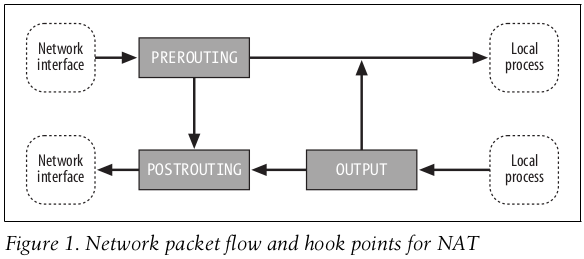
The SNAT target extension is intended for situations where the gateway computer has a static IP address, SNAT is a legal target only in the POSTROUTING chain. Because SNAT is applied immediately before the packet is sent out, only an outgoing interface can be specified.

MASQUERADE target #

The MASQUERADE target extension is intended for situations where the gateway computer has a dynamic IP address. The MASQUERADE target extension provides additional logic that deals with the possibility that the network interface could go off line and come back up again with a different address. Additional overhead is involved in this logic, so if you have a static IP address, you should use the SNAT target extension instead.

...

iptables configuration and information files

/etc/sysctl.conf #

Contains settings for configurations in the /proc/sys directory that are applied at boot time. For example, /proc/sys/net/ipv4/ip_forward can be set to 1 at boot time by adding an entry net.ipv4.ip_forward= 1 to this file.

/proc/net/ip_conntrack #

Dumps the contents of the connection tracking structures if you read it.

/proc/sys/net/ipv4/ip_conntrack_max #

Controls the size of the connection tracking table in the kernel. The default value is calculated based on the amount of RAM in your computer. You may need to increase it if you are getting “ip_conntrack: table full, dropping packet” errors in your log files. See also the entry for /etc/sysctl.conf in this table.

...

Build-in Targets

ACCEPT #

Let the packet through to the next stage of processing. Stop traversing the current chain, and start at the next stage.

DROP #

Discontinue processing the packet completely. Do not check it against any other rules, chains, or tables. If you want to provide some feedback to the sender, use the REJECT target extension.

QUEUE #

Send the packet to userspace (i.e. code not in the kernel). See the libipq manpage for more information.

...

Packet Flow

Forwarding(from one network interface to another) #

  1. mangle:PREROUTING
  2. nat:PREROUTING
  3. mangle:FORWARD
  4. filter:FORWARD
  5. mangle:POSTROUTING
  6. nat:POSTROUTING

Input(from a network interface to a local process) #

  1. mangle:PREROUTING
  2. nat:PREROUTING
  3. mangle:INPUT
  4. filter:INPUT

Output(from a local process to a network interface) #

  1. mangle:OUTPUT
  2. nat:OUTPUT
  3. filter:OUTPUT
  4. mangle:POSTROUTING
  5. nat:POSTROUTING

Local(from a local process to another local process) #

  1. mangle:OUTPUT
  2. nat:OUTPUT
  3. filter:OUTPUT
  4. filter:INPUT
  5. mangle:INPUT

chain's policy

Content #

A chain’s policy determines the fate of packets that reach the end of the chain without otherwise being sent to a specific target.

Only the built-in targets ACCEPT and DROP can be used as the policy for a built-in chain, and the default is ACCEPT. All user-defined chains have an implicit policy of RETURN that cannot be changed.

From #

netfilter hooks

Content #

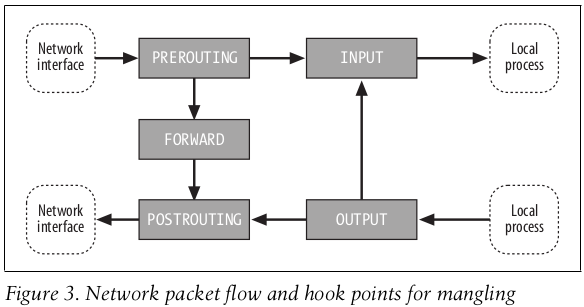
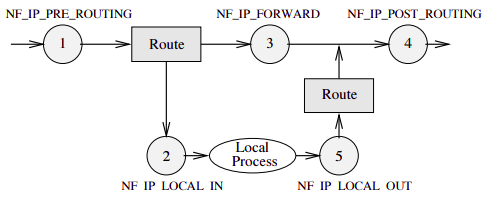
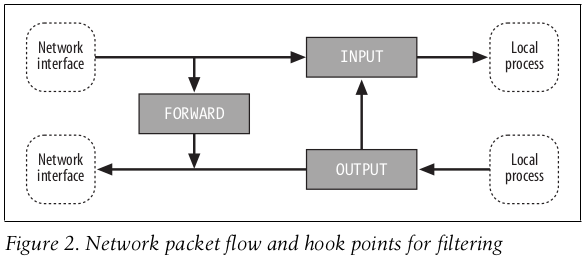
FORWARD … that flow through a gateway computer, coming in one interface and going right back out another. INPUT … just before they are delivered to a local process. OUTPUT … just after they are generated by a local process. POSTROUTING … just before they leave a network interface. PREROUTING … just as they arrive from a network interface (after dropping any packets resulting from the interface being in promiscuous mode and after checksum validation).

...

短时应用导致的CPU使用率升高

Content #

碰到常规问题无法解释的 CPU 使用率情况时,首先要想到有可能是短时应用导致的问题,比如有可能是下面这两种情况。

  1. 第一,应用里直接调用了其他二进制程序,这些程序通常运行时间比较短,通过 top 等工具也不容易发现。

  2. 第二,应用本身在不停地崩溃重启,而启动过程的资源初始化,很可能会占用相当多的 CPU。

对于这类进程,我们可以用 pstree 或者 execsnoop 找到它们的父进程,再从父进程所在的应用入手,排查问题的根源。

Viewpoints #

From #

06 | 案例篇:系统的 CPU 使用率很高,但为啥却找不到高 CPU 的应用?

https://github.com/brendangregg/perf-tools/blob/master/execsnoop

docker0没有IP地址

Content #

可能原因在于 NetworkManager 与 docker0 网卡有冲突。

解决方案修改 NetworkManager 配置,在 keyfile section 中,增加 unmanaged-devices=interface-name:docker0,使 NetworkManager 忽略 docker0 网卡。

[main] plugins=ifupdown,keyfile

[keyfile] unmanaged-devices=interface-name:docker0

重启 NetworkManager 服务重启 docker 服务

From #