
Content #
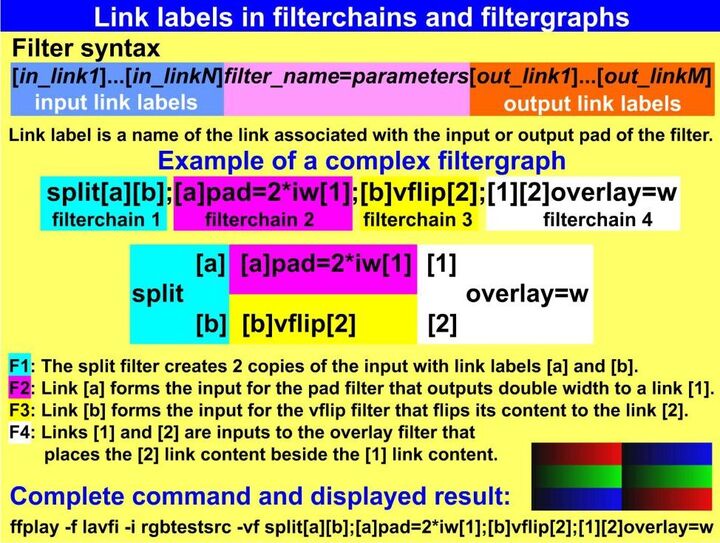
In the filtergraphs can be used link labels that represent the output of a selected filterchain and can be used anywhere in the following filtergraphs. For instance we want to compare the input video with an output denoised by a hqdn3d filter. Without the filtergraphs we must use at least 2 commands, for example:
ffmpeg -i input.mpg -vf hqdn3d,pad=2*iw output.mp4
ffmpeg -i output.mp4 -i input.mpg -filter_complex overlay=w compare.mp4
Using a filtergraph with the link labels, sufficient is only 1 command:
ffplay -i i.mpg -vf split[a][b];[a]pad=2*iw[A];[b]hqdn3d[B];[A][B]overlay=w
The split filter divided the input to 2 outputs labeled [a] and [b]. Then [a] link is used as an input in the second filterchain that creates a pad for the comparison labeled [A]. [b] link is used as an input in the 3rd filterchain that creates a denoised output labeled [B]. The last filterchain uses [A] and [B] labels as inputs to the overlay filter that produces the final comparison.
From #
FFmpeg Basics