
Content #
Sometimes, it is useful to allow the VPN server (or other VPN clients) to access resources connected to a particular client. This is known as client-side routing.
Client-side routing in OpenVPN requires a CCD file for that client containing an iroute statement. It also requires a corresponding route statement in the OpenVPN server configuration file.
Consider the following network layout:
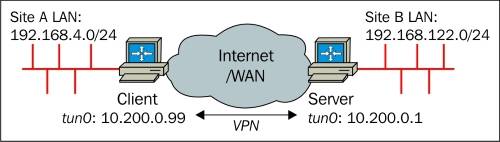
The subnet 192.168.4.0/24 needs to be accessible from the server-side LAN and the server-side subnet 192.168.122.0/24 needs to be accessible from the client-side LAN. This can be achieved as follows:
- Add two lines to the basic-udp-server.conf configuration file:
client-config-dir /etc/openvpn/movpn/clients
route 192.168.4.0 255.255.255.0 10.200.0.1
- Create a CCD file client1 in the directory /etc/openvpn/movpn/clients with contents:
ifconfig-push 10.200.0.99 255.255.255.0
iroute 192.168.4.0 255.255.255.0
push “route 192.168.122.0 255.255.255.0”
- Ensure that IP traffic forwarding is enabled and allowed on both client and server:
[root@client]# sysctl -w net.ipv4.ip_forward=1
[root@server]# sysctl -w net.ipv4.ip_forward=1
The contents of the CCD file instruct OpenVPN that when the client with Common Name client1 connects the IP address for this client is to be set to 10.200.0.99. Furthermore, OpenVPN needs to set an internal route (iroute) for this client so that OpenVPN itself is aware that the subnet 192.168.4.0/24 is located behind this particular client.
Finally, the push route statement instructs OpenVPN to push a route for this particular subnet to client client1. This way, an OpenVPN server can push different routes to different clients in a transparent manner.
From #
Mastering OpenVPN