
Content #
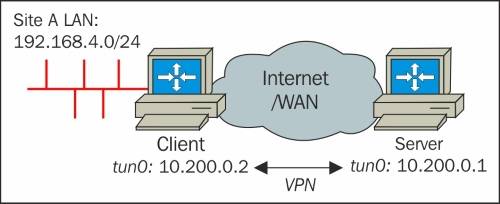 On the server side:
openvpn --ifocnfig 10.200.0.1 10.200.0.2 --dev tun --secret secret.key 0 \
--route 192.168.4.0 255.255.255.0 --daemon --log /var/log/vpn_server.log
On the client side:
openvpn --ifconfig 10.200.0.2 10.200.0.1 --dev tun --secret secret.key 1 \
--remote server.ip --daemon --log /var/log/vpn_client.log
Instead of using the OpenVPn –route statement, we can also use the following command:
[root@server]# ip route add 192.168.4.0/24 via 10.200.0.2
这样配置过后,还必须在客户端做如下配置,才能让OpenVPN server ping通client LAN上的机器。 client LAN side:
-
IP Forwarding or routing needs to be enabled on the OpenVPN client.
net.ipv4.ip_forward=1 -
Make sure that there is a route back to the OpenVPN server on the client LAN. This can be done by adding a route to the LAN geteway, or by adding a static route to each of the machines on the client LAN.
ip route add 10.200.0.0/24 via 192.168.4.100192.168.4.100为OpenVPN client在LAN中的IP地址。
From #
Mastering OpenVPN