
Content #
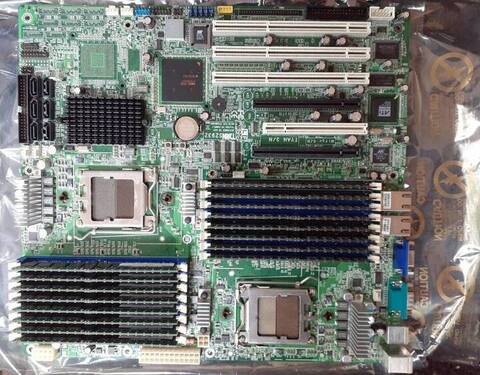 A dual-CPU motherboard
There are two CPU sockets, each with its own bank of memory
sockets. Each bank of memory constitutes a NUMA node.
A dual-CPU motherboard
There are two CPU sockets, each with its own bank of memory
sockets. Each bank of memory constitutes a NUMA node.
[donnie@fedora-teaching ~]$ numactl -H
available: 2 nodes (0-1)
node 0 cpus: 0 2 4 6
node 0 size: 7959 MB
node 0 free: 6982 MB
node 1 cpus: 1 3 5 7
node 1 size: 8053 MB
node 1 free: 7088 MB
node distances:
node   0   1
  0:  10  20
  1:  20  10
By default, most processes run under a randomly chosen CPU core or set of CPU cores upon startup. Sometimes, the operating system might move a running process from one core or set of cores to another. On a normal workstation like I’m running here, that doesn’t matter. But, it might matter on a server that’s running lots of processes. You could possibly improve efficiency and performance by assigning certain processes to their own dedicated CPU cores and NUMA nodes.
First, install the Apache web server by doing:
[donnie@fedora ~]$ sudo systemctl enable --now httpd
Next, assign the Apache service to CPU cores 0 and 2, like this:
sudo systemctl set-property httpd.service AllowedCPUs="0 2"
Now, pretend that this virtual machine has more than one NUMA node, and assign the Apache service to NUMA node 0, like this:
sudo systemctl set-property httpd.service AllowedMemoryNodes=0
These two commands will affect the cpuset.cpus and cpuset.mems attribute files, as you see here:
[donnie@fedora httpd.service]$ pwd
/sys/fs/cgroup/system.slice/httpd.service
[donnie@fedora httpd.service]$ cat cpuset.cpus
0,2
[donnie@fedora httpd.service]$ cat cpuset.mems
0